admin
admin
Imagine this like you’re scrolling online for a gorgeous handmade necklace. You type “eco-friendly coconut shell necklace” into Google or an online website. A few listings appear; some have blurry, shadowed, or cluttered images, while others are bright, clean, and easy to see. Which one do you click? Almost certainly the second.
Now, here’s a surprising twist: it’s not just human shoppers judging your images. Before anyone ever clicks, AI (Artificial Intelligence) examines every photo you upload. Modern e-commerce platforms like Amazon, Shopify, Daraz, and Google Shopping don’t just display product photos-they analyze them to determine relevance, category, and even quality.
If your background is messy, your lighting is uneven, or your product edges are unclear, AI struggles to recognize your item. The result? Fewer impressions, lower rankings, reduced visibility in search results, and ultimately lost sales.
In this article, we’ll break down how AI sees your products, why clear backgrounds matter more than ever, and how you can optimize your images to improve both AI detection and customer engagement.
How AI Understands Product Images
Think of AI as a very picky, super-powered customer. It doesn’t just see colors or shapes – it asks questions like:
What is the main object in this photo?
What category does it belong to – jewelry, shoes, electronics?
Is it new, used, or second-hand?
Is the background clean, cluttered, or distracting?
For AI, a product image is a data point, not just a pretty picture. It breaks down every pixel, analyzes shapes, edges, color tones, and even patterns. Platforms then use this analysis to decide:
Should this product appear in search results?
Which related products should it be grouped with?
Should it be recommended to customers who browsed similar items?
Example Scenario:
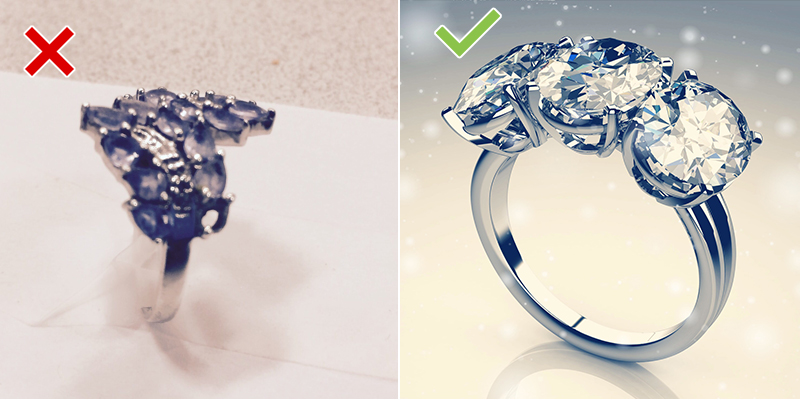
A gold ring photographed on a messy desk with shadows → AI may tag it as “unknown object” or misclassify it as another product type.
The same gold ring photographed on a clean, white background → AI instantly recognizes it as a “gold ring” and associates it with “jewelry,” “gold accessories,” and “handmade products.”
Why Backgrounds Make or Break Your Sales
You might think, “It’s just the background. Why does it matter?” Here’s the reality: your product’s background plays a major role in AI detection, SEO ranking, and human trust.
AI Uses Edge Detection
AI separates the main product from the background using edge detection algorithms. Cluttered backgrounds confuse these algorithms, making it hard to identify your product correctly.
Better SEO Ranking
Search engines prioritize images they can read easily. When AI understands your product, it boosts the listing in search results, improving discoverability.
Automatic Categorization
Platforms like Amazon and Daraz use AI to automatically categorize products. A clean background ensures your product appears under the correct categories. Example: a coconut shell necklace with a clean background might show up automatically under “eco-friendly jewelry.”
Higher Click-Through Rates
Humans respond to clean, bright, and well-composed images. Studies show listings with clear images get 67% more clicks than cluttered ones.
Marketplace Compliance
Most e-commerce platforms have image standards. Amazon, for instance, requires a pure white background for main product images. Failure to meet these standards can lead to image rejection, meaning your product won’t go live until fixed.
Common Mistakes Sellers Make
Even experienced sellers make simple errors that reduce visibility:
Cluttered backgrounds: photographing products on tables, floors, or in hands.
Low-resolution images: blurry or pixelated photos fail to capture details.
Cropping errors: cutting off edges of the product reduces AI detection accuracy.
Inconsistent lighting: shadows, reflections, and uneven exposure confuse AI.
Random file names: IMG001.jpg provides no context for AI or SEO.
Friendly Advice: Pretend you’re explaining your product to a friend online. If they can’t see it clearly, AI can’t either. Fixing this is not optional-it’s essential.
How to Make Images AI-Friendly
Here’s a step-by-step approach to make AI (and humans) happy:
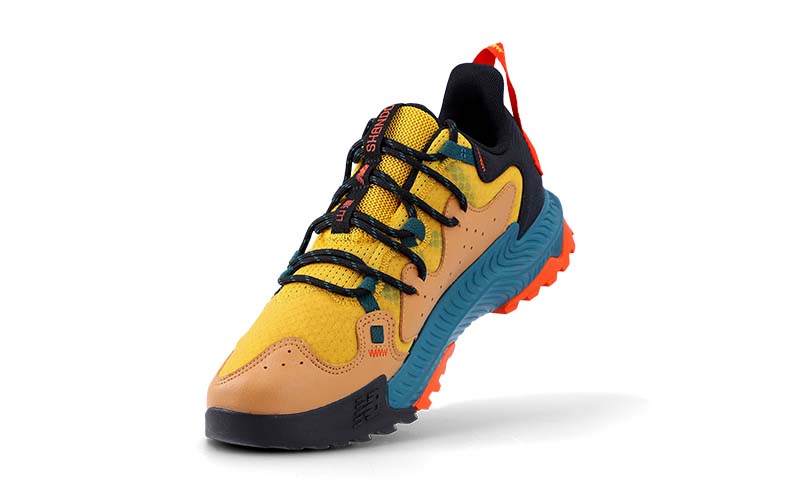
Use a Plain Background – White (#FFFFFF) or light gray (#F8F8F8) works best. It separates your product edges clearly for AI detection.
Use Soft, Even Lighting – Avoid shadows or glare. Natural daylight or softbox lighting creates an evenly lit image, making AI analysis more accurate.
Show Multiple Angles – AI and customers prefer seeing 3–5 angles: front, back, side, and close-ups for details.
Use High Resolution – Minimum: 1000×1000 pixels. Ideal: 2000×2000 pixels to allow zooming and ensure consistent visual quality across listings.
Name Files Descriptively – Instead of “IMG_001.jpg,” use:coconut-shell-elephant-stud-earrings.jpg
Descriptive filenames help AI understand product context and improve SEO.
Use Background Removal Tools – Free tools like Remove.bg, Canva, and Adobe Express can remove messy backgrounds in seconds.

How Customers Experience AI-Optimized Images
Let’s put it in perspective:
A customer searches “handmade eco necklace.”
Listings with messy or dark images don’t appear at the top because AI fails to categorize them.
Clean, white-background images rank higher and show up in recommendations.
Result? Your customer sees your product first, clicks, and is more likely to purchase.
Example:
A handmade jewelry seller optimized their images, and AI started automatically suggesting their products in related searches, increasing impressions and clicks.
Advanced SEO Tips for Images
Alt Text: Add descriptive alt text:
“Eco-friendly coconut shell earrings with elephant pendant on white background.”Consistent Dimensions: Use the same aspect ratio for all product images for a professional catalog look.
Compress Without Losing Quality: Use TinyPNG or ImageOptim to reduce file size. Faster pages = better Google ranking.
Test AI Detection: Upload images to Google Images to see if AI identifies the product correctly. If not, improve clarity.
How AI Classifies Products
AI doesn’t rely on one image-it compares thousands of similar items across the web. It evaluates:
| Criteria | What it Means | Why it Matters |
|---|---|---|
| Object Recognition | Identifies main product | Correct categorization |
| Color Detection | Reads main color tones | Filters and visual searches |
| Background Uniformity | Measures clarity | Trust score & visibility |
| Aspect Ratio & Size | Checks consistency | Compatibility with marketplace layout |
| Image Authenticity | Detects stock or fake images | Prevents spam & copyright issues |
Real-Life Case Study
A Sri Lankan handmade jewelry brand wanted to increase online sales.
Before Optimization:
✨Dark, shadowed photos
✨Random file names
✨Cluttered backgrounds
After Optimization:
✅Photos re-shot on white backgrounds
✅Correct file names
✅Proper lighting and multiple angles
Result: 42% increase in sales | Better Google Shopping rankings | AI automatically categorized products correctly
Human Takeaway: Small changes can significantly impact both AI detection and customer trust.
The future of e-commerce is visual intelligence. AI decides which products customers see first. Humans decide which ones they click. Your product’s image is the bridge connecting the two.
Key Takeaways:
Clear white or neutral backgrounds are essential
Multiple angles and bright lighting improve AI understanding
Descriptive filenames and alt text boost SEO
Clean images increase human trust and click-through rates
Investing in better product images is not just about aesthetics-it’s about making your product discoverable, trusted, and purchased.
Next time you upload a product, imagine a picky AI scanning it, a customer scrolling, and yourself wondering if your product stands out. Make it easy for both and watch your visibility and sales grow.