admin
admin
Good morning class! 👋
Today, we are going to learn something very important for anyone running an online store or working in eCommerce. The topic is:
“Why it’s better to show both product categories and individual products in the website search results.”
This may sound a little technical at first, but don’t worry. I will explain everything step by step, using examples and real screenshots. You’ll understand not just how it works, but also why it’s so helpful for SEO, customers, and your business.
🧠 What Are We Comparing?
Let’s begin by understanding the two different ways a website search can work when a customer types in something like “bag”.
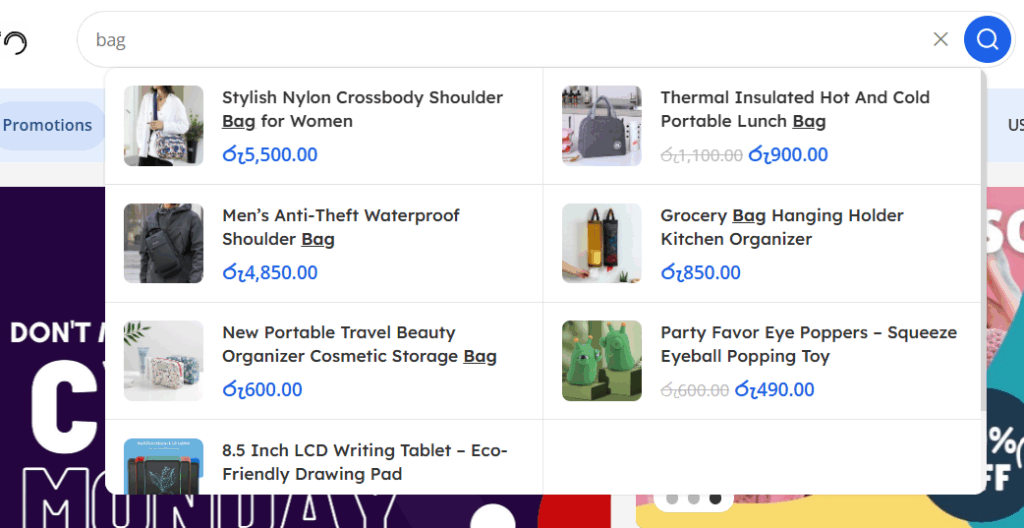
🔵 Example 1: Showing Only Products
Imagine you go to an online store and type the word “bag.”
The search shows you a list of products like:
School bag
Lunch bag
Shoulder bag
Makeup bag
Each result has an image, name, and price.
👉 This is called Product-Only Search.
🟢 Example 2: Showing Categories + Products
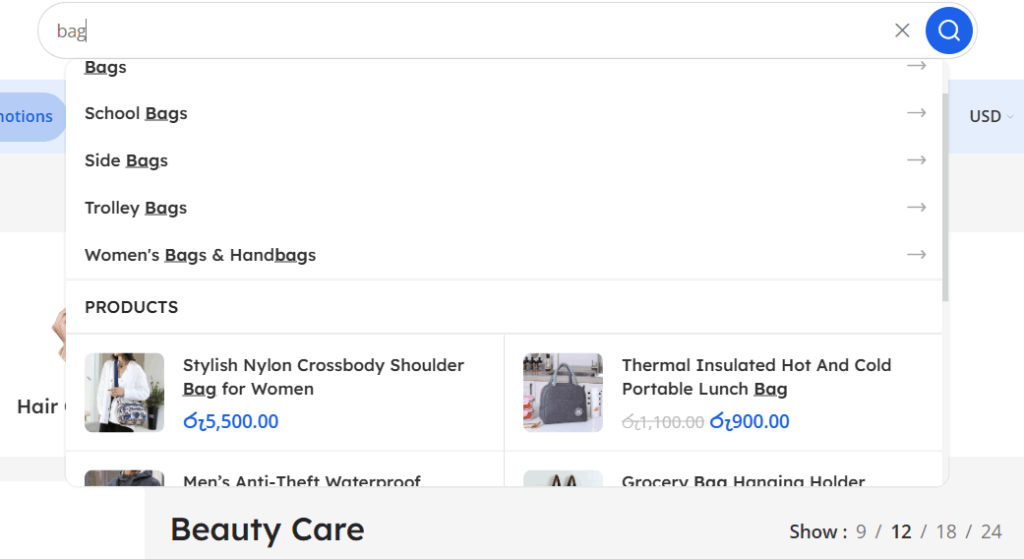
Now imagine you type “bag” again.
But this time, the search results show you:
First:
🎒 Bag Categories like:
School Bags
Trolley Bags
Handbags
Diaper Bags
Then:
👜 Matching Products under those categories.
👉 This is called Category + Product Search.
Now, let’s ask the big question…
❓Which one is better? And why?
Yes, students — Example 2 is much better!
Let me now explain why — using four main points:
✅ 1. SEO Benefits (Search Engine Optimization)
First, let’s understand how this affects SEO — which helps people find your website on Google.
🔍 Why is showing categories good for SEO?
Categories are keyword-rich pages. That means they help search engines understand your site better.
When your category pages (like School Bags or Trolley Bags) appear in search, Google also starts ranking them higher.
You are not just helping visitors — you are also helping Google understand your site’s structure!
👉 So, instead of showing just one product, you are showing a group of related products — which brings more traffic to your store.
🧑🏫 Think of it like this:
Products are like leaves. Categories are like branches.
If we only show leaves, Google can’t understand the whole tree!
😊 2. It Helps Customers Find What They Want
Now let’s think like a customer.
Sometimes, people don’t know exactly what they want. They just type “bag.”
If you only show products, they might see 100 different styles and feel confused.
But if you show categories first (like Diaper Bags or School Bags), it becomes easier.
They click on the category that matches their need and see all the relevant products inside.
👉 This makes the shopping experience smoother and happier.
🧑🏫 Students, remember:
A happy customer = more sales!
🖱️ 3. Increases Clicks and Engagement
Now, let’s talk about how this affects click-through rate (CTR) — that means how many people actually click on something in the search.
When you show only products, the customer has limited options.
But when you show both:
They might click on a category if they want to explore.
Or click on a specific product if they already like something.
This gives them more ways to interact — which increases clicks and reduces bounce rate (the number of people who leave quickly).
🧑🏫 Tip:
More clicks = more time on site = more chances of making a sale!
💡 4. Keeps Customers on the Website Longer
Now imagine you only show products, and the customer doesn’t like any of them.
They might close your site and go to another store.
But if you show categories, the customer can say:
“Hmm… maybe I want to check the ‘Trolley Bags’ section instead.”
This makes them stay longer and explore.
💬 The longer they stay, the more trust they build — and they are more likely to buy something.
🧑🏫 In marketing, this is called Customer Retention.
And it’s very important for building loyalty.
🛠️ How Can You Set This Up on Your Website?
Great question! If you’re running a store or working with a developer, here are the steps:
Front-End (What users see):
When a customer types in the search bar, show:
First: a list of matching categories (with icons).
Then: a few products under those categories.
Back-End (The logic behind it):
Use a smart search engine like:
Algolia
ElasticSearch
Or custom JavaScript
Make sure both your categories and products are indexed.
🧑🏫 Reminder:
Your website should be mobile-friendly too — many people shop on phones!
📝 Summary (What You Learned Today)
Let’s do a quick recap, class!
| Feature | Product-Only Search | Category + Product Search ✅ |
|---|---|---|
| Helps SEO | ❌ No | ✅ Yes |
| Easy for customers to explore | ❌ Limited options | ✅ Clear guidance |
| Increases click rate | ❌ Less clicks | ✅ More engagement |
| Keeps customers longer | ❌ Not engaging | ✅ Better retention |
So the best practice is always to use Category + Product Search for your eCommerce website.
It creates a smarter, faster, and more enjoyable experience for everyone!
🎓 Final Thought
Remember, as future business owners, marketers, or designers — your goal is not just to sell products…
…your goal is to guide the customer, help them, and keep them coming back.
And a smart search bar — with both categories and products — is a small change that makes a big difference.
Class dismissed! 😊
If you’d like, I can help you design or optimize your search bar. Just raise your hand (or send me a message)! 🙋♂️