Hey everyone! 🚀
If you’ve ever struggled with slow, unstable internet in Sri Lanka—especially outside major cities—you’ve probably wondered if satellite internet could finally be the solution.
In 2025, Starlink, Elon Musk’s satellite internet service by SpaceX, officially became available in Sri Lanka. I decided to sign up, test it in real conditions, and compare it to local ISPs like SLT, Dialog, and Airtel. Here’s my detailed, hands-on review.🎉
Here’s what I’ll cover:
What exactly Starlink is
How to set it up easily
Starlink vs Local Networks
How it made its way to Sri Lanka
How you can get your hands on it
All the packages and pricing details
What is Starlink?
Starlink uses low Earth orbit (LEO) satellites to beam internet directly to a small dish installed at your home or office. Unlike traditional fiber or 4G/5G, Starlink isn’t dependent on ground towers or cables—making it ideal for rural and coastal areas where coverage is poor.
Key difference from local ISPs:
Fiber & mobile internet depend on physical infrastructure (towers, cables).
Starlink connects to satellites, meaning you can get internet literally anywhere with a clear sky view.
When Did Starlink Arrive in Sri Lanka?
Here’s the quick history:
June 2024: Government gives preliminary approval.
July 2024: Telecom laws updated after 28 years to allow satellite ISPs.
Mid-2025: Licensing completed.
2 July 2025: Official launch — Starlink opens to everyone in Sri Lanka.
That’s lightning-fast compared to how telecom projects usually roll out here.
How to Buy Starlink in Sri Lanka
You can get it two ways:
Direct from Starlink’s website (starlink.com/lk) — check your address, choose a plan, order online.
From Singer Sri Lanka (link here) for in-store pickup or local delivery.
Steps for Online Order:
Enter your location to check availability.
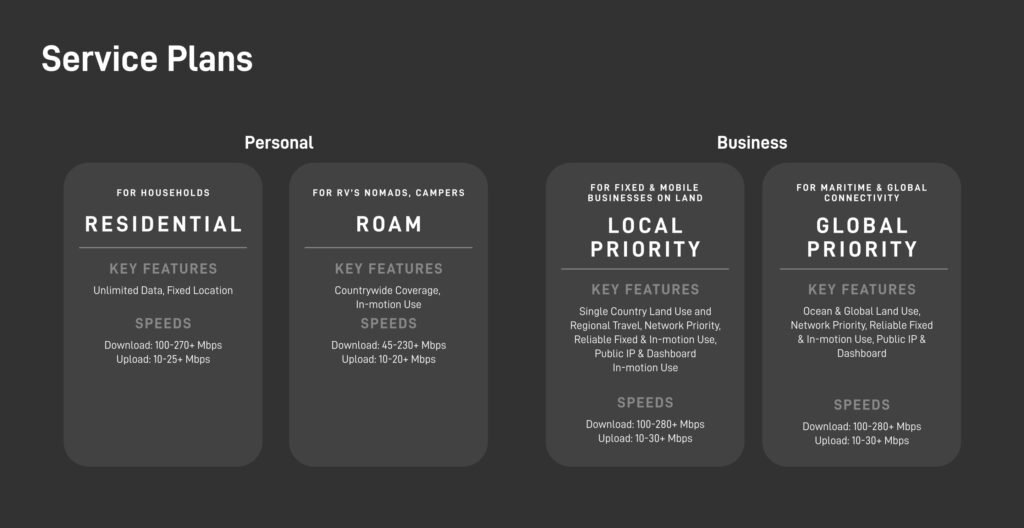
Select your plan (Residential, Roam, or Business).
Add the required hardware kit.
Pay online.
Delivery in around 1–2 weeks.
Residential
Lite: LKR 9,200–12,000/month – Unlimited but lower priority during peak times.
Standard: LKR 15,000/month – Full priority speeds.
Hardware: ~LKR 118,000.
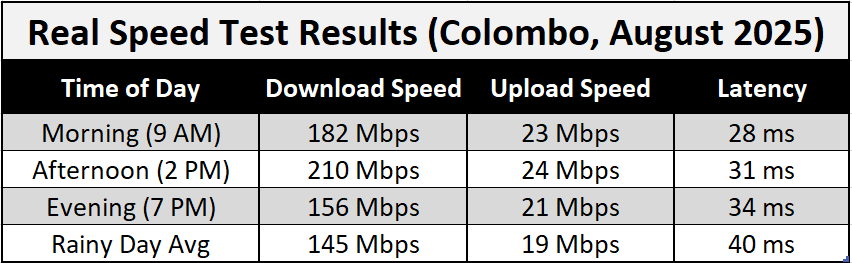
Speeds: 100–270+ Mbps download, 10–25+ Mbps upload.
Roam (Portable Use) Plans
These are for people who want internet anywhere, whether at home, in a rural village, or while traveling.
50 GB Plan – LKR 15,000/month
You get 50 GB of data per month. Once used, speed may slow down. Ideal for light browsing, video calls, and occasional streaming.Unlimited Plan – LKR 27,000/month
No fixed limit — perfect if you stream movies, game online, or work remotely without worrying about running out of data.
💻 Hardware Cost: ~LKR 60,200 one-time payment for the Starlink dish, router, cables, and stand.
Business Plans
These are high-priority connections built for companies, large teams, or people needing maximum reliability and speed.
40 GB Priority Data – LKR 24,100/month
Priority data means faster speeds even during network congestion. Ideal for small offices.1 TB Priority Data – LKR 63,200/month
Designed for businesses with heavy daily use like large file transfers, video conferencing, or streaming multiple feeds.2 TB Priority Data – LKR 127,000/month
This is for data-hungry setups — think large media houses, remote sites, or internet service reselling.
📦 Performance Kit Cost: ~LKR 911,000 one-time payment.
Includes a larger, more powerful dish, heavy-duty router, and stronger weather resistance — built to handle maximum speeds and uptime.
Unboxing & Installation
When you get the box, here’s what’s inside:
Starlink Dish (“Dishy”)
Wi-Fi router
Power supply
Cables
Dish stand
Setup process:
Place the dish outside with a clear view of the sky.
Connect cables to the router and power supply.
Turn it on.
Use the Starlink app to find the best spot.
You’ll be online in about 15 minutes – no technician needed.
Starlink vs Mobile Connections in Sri Lanka
Here’s the truth – mobile internet (Dialog, Mobitel, Airtel, Hutch) is good in urban areas, but it’s a nightmare in remote villages. Even in some Colombo suburbs, speed drops when the tower is congested.
| Feature | Starlink | Fiber (SLT/LANKA BELL) | 4G/5G Mobile Data |
|---|---|---|---|
| Coverage | Anywhere (satellite) | Urban & semi-urban only | Depends on tower availability |
| Download Speed | 100–280 Mbps | 50–200 Mbps | 20–200 Mbps (5G), ~10–40 Mbps (4G) |
| Upload Speed | 10–30+ Mbps | 5–50 Mbps | 5–20 Mbps |
| Latency | 20–50 ms | 5–20 ms | 30–100 ms |
| Setup Time | 15–30 mins (self-install) | Days/weeks | Instant (SIM card) |
| Mobility | Yes (Roam plan) | No | Yes |
| Ideal For | Remote areas, travel, backup connection | Fixed home/office | On-the-go browsing |
Why Choose Starlink Over Mobile Internet?
Consistency – 📶 (strong signal bars) or ⚡ (lightning bolt for speed/consistency)
No dead zones – ☁️ (cloud) or 🛰️ (satellite)
Higher upload speeds – 📤 (upload arrow) or 🎥 (video camera for creators)
Future-proof – 🔮 (crystal ball) or 🚀 (rocket for future growth)
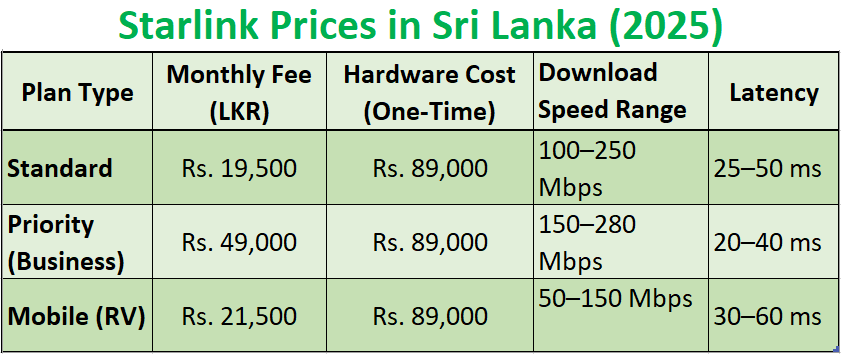
Starlink Price in Sri Lanka
If you’re curious about the Starlink price in Sri Lanka, the initial setup and monthly fees might seem higher than traditional mobile internet plans, but the value in speed, coverage, and consistency often justifies the cost especially for businesses, remote workers, and content creators.
Starlink Speed Test Results
Users in Sri Lanka have reported impressive results in Starlink speed tests, with download speeds ranging between 100 to 280 Mbps and upload speeds significantly higher than standard mobile internet. These numbers make it a competitive alternative, especially where fiber or 5G networks aren’t available.
Final Verdict – Is It Worth It?
If you live in Colombo with fibre internet, Starlink might feel pricey.
But if you’re in a rural village, run a business outside city limits, travel constantly, or just want a rock-solid backup connection, Starlink is a game-changer.
Yes, the hardware cost is high, but the freedom to get high-speed internet anywhere in Sri Lanka is something no mobile ISP can match.